Guide: Build a REST API
Build a Zod-validated REST service that auto-emits OpenAPI 3.1 and serves Swagger UI. By the end you'll have controllers, validation, dependency injection, auth, and a browsable spec.
Prerequisites: skim Dependency injection and Schema-first decorators. Working example:
examples/hello-rest—pnpm -F hello-rest start.
1. Schemas first
Define your shapes as Zod schemas in one place and share them. (Keeping schemas in their own module lets a typed client import the exact same objects.)
// schemas.ts
import {z} from 'zod';

export const HelloPath = z.object({name: z.string().min(1).max(64)});
export const Greeting = z.object({greeting: z.string()});
export const EchoIn = z.object({text: z.string().min(1).max(280)});
export const EchoOut = z.object({echoed: z.string(), at: z.string()});
2. A controller
A controller is a plain class. @api({basePath}) sets a shared prefix; each
method gets a verb decorator carrying its schemas. The handler receives the
validated input bundle in slot 0.
import {z} from 'zod';
import {api, get, post} from '@agentback/openapi';
import {EchoIn, EchoOut, Greeting, HelloPath} from './schemas.js';

@api({basePath: '/greet'})
export class GreetingController {
  @get('/hello/{name}', {path: HelloPath, response: Greeting})
  async hello(input: {
    path: z.infer<typeof HelloPath>;
  }): Promise<z.infer<typeof Greeting>> {
    return {greeting: `Hello, ${input.path.name}!`};
  }

  @post('/echo', {body: EchoIn, response: EchoOut, description: 'Echoed input'})
  async echo(input: {
    body: z.infer<typeof EchoIn>;
  }): Promise<z.infer<typeof EchoOut>> {
    return {echoed: input.body.text, at: new Date().toISOString()};
  }
}
What you get for free:
GET /greet/hello/world→{"greeting":"Hello, world!"}.POST /greet/echowith{"text":""}→ 422 with the Zod issues.GET /openapi.json→ an OpenAPI 3.1.1 document derived from these schemas.
3. Start the server
RestApplication binds servers.RestServer for you. Register the controller,
configure a port, start.
import {RestApplication} from '@agentback/rest';
import {GreetingController} from './greeting.controller.js';

const app = new RestApplication();
app.configure('servers.RestServer').to({port: 3000, host: '127.0.0.1'});
app.restController(GreetingController);
await app.start();

const server = await app.restServer;
console.log(`listening at ${server.url}`);
port: 0 picks a free port (handy for tests — read it back from server.url).
4. Inject dependencies into handlers
Declare a dependency at slot 1+ (slot 0 is the input bundle). The container resolves it per the binding's scope.
import {inject} from '@agentback/core';

@post('/echo', {body: EchoIn, response: EchoOut})
async echo(
  input: {body: z.infer<typeof EchoIn>},
  @inject('services.Clock') clock: {now(): string},
) {
  return {echoed: input.body.text, at: clock.now()};
}
Bind it once: app.bind('services.Clock').to({now: () => new Date().toISOString()}).
For tests, rebind to a fake — no mocking framework needed.
5. Add authentication & authorization
The auth stack is components. Add JWT auth, then gate methods with
@authenticate and @authorize.
import {authenticate} from '@agentback/authentication';
import {authorize} from '@agentback/authorization';
import {
  JWTAuthenticationComponent,
  JWTBindings,
} from '@agentback/authentication-jwt';
import {SecurityBindings, UserProfile, securityId} from '@agentback/security';

// wiring (before start)
app.bind(JWTBindings.SECRET).to(process.env.JWT_SECRET ?? 'dev-secret');
app.bind(JWTBindings.EXPIRES_IN).to('1h');
app.component(JWTAuthenticationComponent);

@api({basePath: '/auth'})
class AuthController {
  // any authenticated user
  @authenticate('jwt')
  @get('/me', {response: Me})
  async me(
    @inject(SecurityBindings.USER) user: UserProfile,
  ): Promise<z.infer<typeof Me>> {
    return {
      id: user[securityId],
      name: user.name ?? '',
      roles: (user as any).roles ?? [],
    };
  }

  // authenticated AND has the 'admin' role
  @authenticate('jwt')
  @authorize({allowedRoles: ['admin']})
  @get('/secret', {response: Secret})
  async secret(): Promise<z.infer<typeof Secret>> {
    return {secret: '🐇 deeper.'};
  }
}
Note @get('/me') declares no input schema, so slot 0 is free for @inject —
see the handler signature rules.
6. Browse it: Swagger UI
import {installExplorer} from '@agentback/rest-explorer';

await installExplorer(app, {title: 'My API'}); // before app.start()
// -> Swagger UI at /explorer, pointed at /openapi.json
Want to see the DI container itself? Mount the
Context Explorer:
installContextExplorer(app) → /context-explorer/.
7. Observability (optional)
Health checks and Prometheus metrics are one-liners:
import {installHealth, registerHealthCheck} from '@agentback/extension-health';
import {installMetrics} from '@agentback/extension-metrics';

registerHealthCheck(app, 'health.checks.db', {
  name: 'db',
  type: 'readiness',
  async check() {
    /* throw to report unhealthy */
  },
});
await installHealth(app); // GET /health, /ready
await installMetrics(app); // GET /metrics
Customizing requests
You don't reach for sequences/actions (the framework deliberately dropped them). Instead:
- Per-route behavior → it's on the decorator (schemas, status, description).
- Cross-cutting behavior (CORS, rate limit, auth probes, tracing) → middleware or interceptors.
- Envelope/error-shape changes → subclass
RestServerand overridedispatch/sendResult/sendError(how).
CORS is built in — configure it on the REST server:
app.configure('servers.RestServer').to({cors: true}) (or pass a CorsOptions
object from the cors package for fine control).
Recap
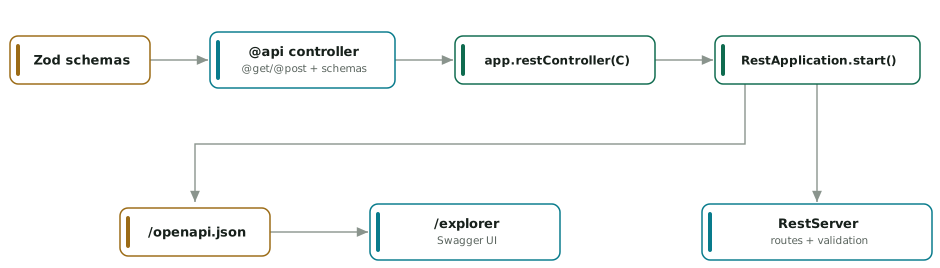
diagram source (mermaid)
graph LR
  S["Zod schemas"] --> C["@api controller<br/>@get/@post + schemas"]
  C --> R["app.restController(C)"]
  R --> A["RestApplication.start()"]
  A --> RS["RestServer: routes + validation"]
  A --> O["/openapi.json"]
  O --> E["/explorer (Swagger UI)"]
Next
- Build an MCP server — the same shape, for tools.
- Build a hybrid app — REST + MCP together, one schema set.
- Composition & extensibility — middleware, interceptors, custom dispatch.