Concept: Components, Servers & Lifecycle
Dependency injection gives you a container of bindings. This doc covers the three pieces that turn that container into a runnable application: components package bindings, servers expose them over a transport, and the lifecycle starts and stops everything in order.
Package:
@agentback/core.
Component — a bundle of bindings
A Component is the unit of reuse. It's a class that declares bindings to add
to the application: controllers, providers, classes, servers, and lifecycle
observers. Registering it with app.component(C) merges all of that into the
container in one call.
import {Component, Application} from '@agentback/core';

class GreetingComponent implements Component {
  controllers = [GreetingController];
  classes = {'services.Clock': Clock};
  providers = {'services.Token': TokenProvider};
  // servers = {MCPServer};               // contribute a server
  // lifeCycleObservers = [MetricsFlush];  // run code on start/stop
}

const app = new Application();
app.component(GreetingComponent);
This is how the framework ships capabilities. MCPComponent,
JWTAuthenticationComponent, the health and metrics extensions — each is a
Component you drop in with one line. Your own cross-cutting features (a tenant
resolver, an audit log, a set of admin tools) become components too, which is
what keeps large apps composable: a feature is a component, not a diff against
main().
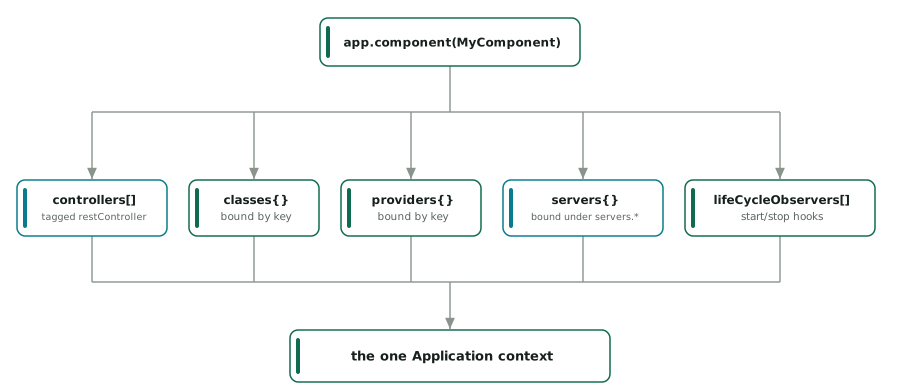
diagram source (mermaid)
graph TD
  C["app.component(MyComponent)"]
  C --> ctl["controllers[] → tagged controller"]
  C --> cls["classes{} → bound by key"]
  C --> prov["providers{} → bound by key"]
  C --> srv["servers{} → bound under servers.*"]
  C --> obs["lifeCycleObservers[] → start/stop hooks"]
  ctl & cls & prov & srv & obs --> App["the one Application context"]
Server — exposes bindings over a transport
A Server is a LifeCycleObserver with a listening flag. The framework ships
two:
RestServer(@agentback/rest) — discovers bindings taggedcontroller, builds routes from their decorator metadata, validates with Zod, serves/openapi.json.MCPServer(@agentback/mcp) — discovers bindings taggedmcpServer, registers their@tool/@resource/@promptmethods with the MCP SDK, runs a transport (stdio by default).
Both are just bindings under servers.*. You don't instantiate them directly —
you register them (often via a component or a RestApplication) and the
application's lifecycle starts them.
import {RestApplication} from '@agentback/rest';
import {MCPComponent} from '@agentback/mcp';

const app = new RestApplication(); // binds servers.RestServer for you
app.component(MCPComponent); // binds servers.MCPServer
app.configure('servers.RestServer').to({port: 3000});
await app.start(); // starts BOTH servers
A server discovers controllers/tools at start time by querying the container
for the relevant tag. That's why adding a controller is just
app.restController(C) — no router edit, no manual registration. The
architecture overview traces this discovery step
by step.
Writing your own server
Implement Server (extend the lifecycle), bind it under servers.*, and the
app will start/stop it with everything else:
import {Server, Application} from '@agentback/core';

class MetricsServer implements Server {
  private _listening = false;
  get listening() {
    return this._listening;
  }
  async start() {
    /* open a port, begin scraping… */ this._listening = true;
  }
  async stop() {
    this._listening = false;
  }
}
app.server(MetricsServer); // bound under servers.MetricsServer, tagged `server`
Lifecycle — start and stop, in order
Application extends a LifeCycleObserver registry. await app.start() and
await app.stop() drive every registered observer (servers included) through
three optional hooks:
| Hook | When | Typical use |
|---|---|---|
init() |
once, before first start | one-time setup |
start() |
on app.start() |
open ports, connect transports |
stop() |
on app.stop() (reverse order) |
graceful shutdown, flush, close |
import {lifeCycleObserver, LifeCycleObserver} from '@agentback/core';

@lifeCycleObserver('metrics')
class MetricsFlusher implements LifeCycleObserver {
  async start() {
    /* begin periodic flush */
  }
  async stop() {
    /* flush remaining + clear timer */
  }
}
app.lifeCycleObserver(MetricsFlusher);
Observers run in groups, and stop runs in reverse start order so dependencies
shut down after their dependents. RestServer/MCPServer use these same hooks —
they have no privileged lifecycle, they're observers like any other. The HTTP
server stops gracefully (drains in-flight requests) on stop().
Putting it together
A typical app is: construct an application, add components, register your controllers/tools/services, configure servers, start.
const app = new RestApplication();
app.component(JWTAuthenticationComponent); // a feature bundle
app.component(MCPComponent); // adds servers.MCPServer
app.restController(GreetingController); // REST surface
app.service(WeatherTools); // MCP surface (an MCP_SERVERS extension)
app.configure('servers.RestServer').to({port: 3000});
await app.start(); // both servers up, controllers + tools discovered
// … later
await app.stop(); // graceful shutdown of everything, reverse order
Next
- Build a REST API — the REST server end to end.
- Build an MCP server — the MCP server end to end.
- Composition & extensibility — components, middleware, interceptors, and extension points in depth.